
App Platforms & Databases

Agenda


Azure Application Hosting
App Service • Functions • Container Platforms
Cloud Application Hosting Continuum

Infrastructure Platform

Container Platform

Application Platform

Serverless Platform
Challenges | |||
| Patching, Management, Deployment | Management (Container & Pod) | Limitations of Execution environment | Cold start, long running process |
What you get | |||
| Curated VM Hosting | Curated Orchestration | Curated Execution Environment | Scale to ‘zero’ |
Technology Decisions | |||
| IT / Infra focused Value Prop | Dev / App Admin focused Value Prop | ||
|
⬅ More Control of execution environment
Less Control of execution environment ➡
|
|||
|
⬅ Less Agile development & deployment
More Agile development & deployment ➡
|
|||
Azure App Service
Fully managed platform for web applications (PaaS)
- HTTP-based hosting for web apps, REST APIs, and mobile backends
- Supports .NET, Java, Node.js, Python, PHP, Ruby, and containers
- Built-in autoscale, CI/CD, deployment slots, and custom domains
- Runs on Windows or Linux App Service Plans
- Enterprise-grade SLA — up to 99.95%
App Service Key Features


Deployment Slots
Zero-downtime releases with staging environments
- Each slot is a live app with its own hostname and config
- Swap traffic between slots instantly — no cold start
- Slot-specific app settings (e.g., staging DB connection string)
- Auto-swap — deploy to staging, auto-promote to production
- Available from Standard tier and above (up to 20 slots)
Auto Scale
Automatically adjust capacity to match demand
- Scale out (add instances) or in (remove instances) automatically
- Rules based on CPU %, memory %, HTTP queue length, or custom metrics
- Schedule-based scaling — e.g., more instances during business hours
- Cooldown periods prevent flapping (default 5 min)
- Available from Standard tier — Premium v3 supports up to 30 instances
Custom Domains & TLS
Production-ready web hosting with your brand
- Map custom domains via CNAME or A records
- Free managed certificates — auto-renewed, zero config (Standard+)
- Bring your own certificate or import from Key Vault
- Enforce HTTPS-only and minimum TLS version (1.2 recommended)
- SNI SSL included at no extra cost; IP SSL for legacy clients
App Service Networking
Inbound
- App-assigned & custom domains
- IP-based access restrictions
- Private Endpoints
- App Gateway / Front Door integration
Outbound
- VNet Integration (regional)
- NAT Gateway for static outbound IP
- Hybrid Connections
- Service Endpoints / Private Link
VNet Integration
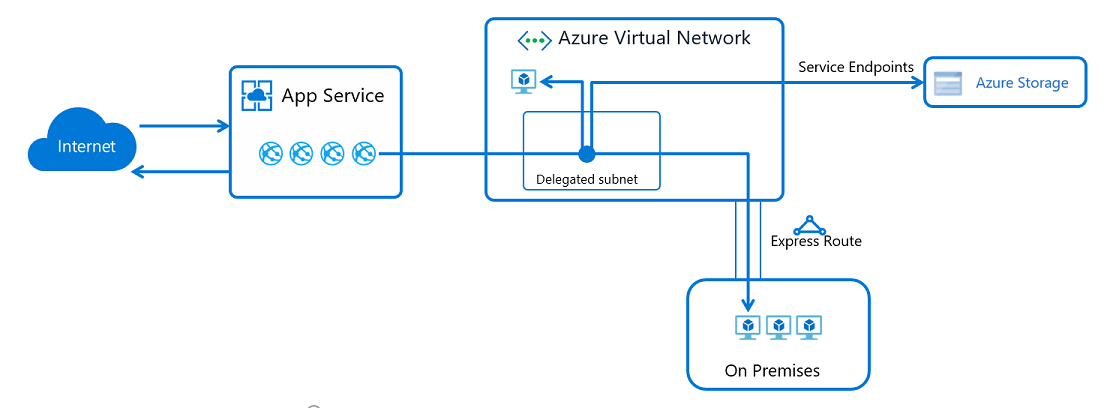
Source: Microsoft Learn — App Service networking features
App Service Plans
Compute resources that power your apps
- Apps run on an App Service Plan — a set of VMs
- Multiple apps can share the same plan to optimize cost
- Plan tier determines features, scale limits, and SLA
- Scale up (bigger VM) or out (more instances)
App Service Plan Tiers
| Tier | Use Case | Scale Out | Key Features |
|---|---|---|---|
| Free / Shared | Dev / test | — | Shared infrastructure, no SLA |
| Basic | Low-traffic apps | Up to 3 | Dedicated VMs, custom domains |
| Standard | Production | Up to 10 | Autoscale, slots, VNet, backups |
| Premium v3 | High-performance | Up to 30 | Faster CPUs, more memory, zone redundancy |
| Isolated v2 | Compliance / isolation | Up to 100 | Private ASE, single-tenant, network isolation |
App Service Best Practices
- Use deployment slots for zero-downtime releases
- Enable health checks to auto-replace unhealthy instances
- Use managed identities — avoid storing credentials
- Enable diagnostic logging and integrate with App Insights
- Configure autoscale rules based on CPU, memory, or HTTP queue
Azure Functions
Serverless compute — event-driven code at scale
What is Serverless?
Azure Functions Overview
- Write small, focused functions triggered by events
- Supports C#, JavaScript, F#, Java, and Python (Go, Rust, others via custom handlers)
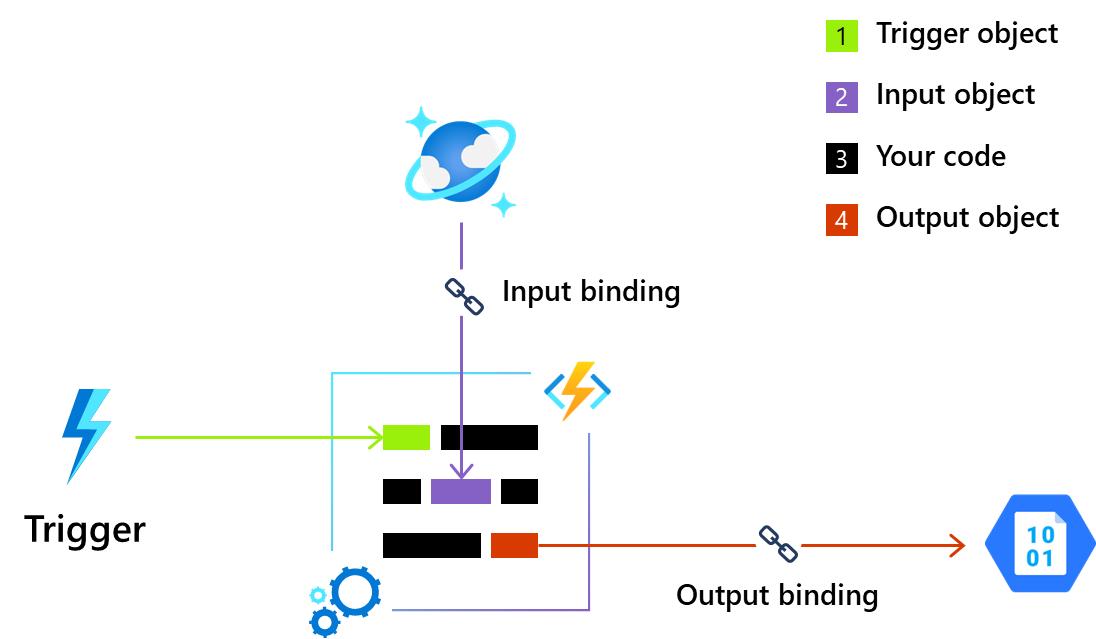
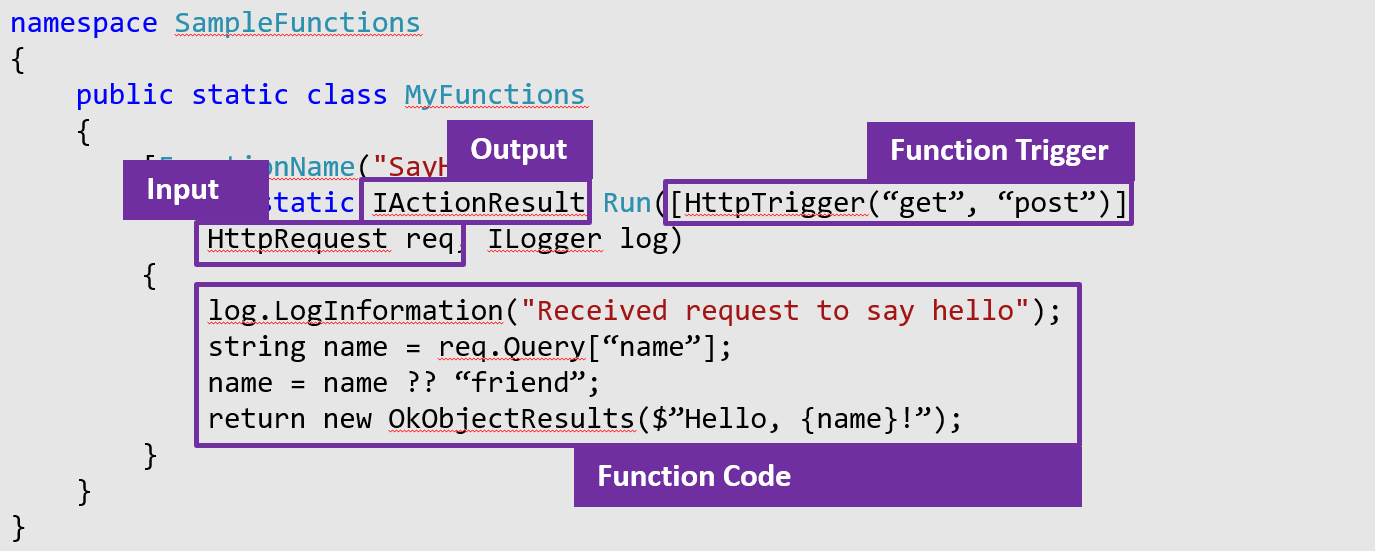
- Triggers start execution — Bindings connect to services
- Stateless by default; Durable Functions for workflows
- Multiple hosting options with different scale & pricing models
Functions Programming Model


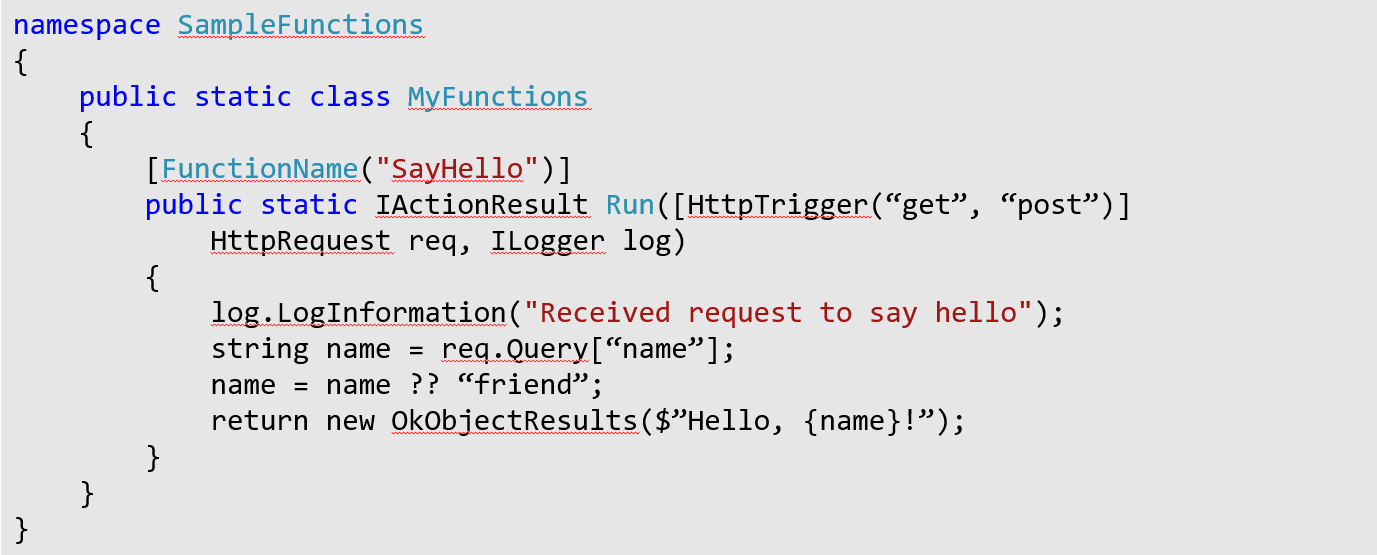
Triggers, Inputs and Outputs → Bindings
Azure Functions features input and output bindings which provide a means of pulling data or pushing data to other services.
These bindings work for both Microsoft and third-party services without the need to hard-coding integrations.
Function Code
Function Code
Functions Hosting Plans
| Plan | Scale | Pricing | Best For |
|---|---|---|---|
| Consumption | Auto (0 → 200) | Pay per execution | Sporadic / bursty workloads |
| Flex Consumption | Auto (0 → 1000) | Pay per execution | High-scale serverless, VNet |
| Premium (EP) | Event-driven (1 → 100) | Pre-warmed instances | No cold start, VNet, longer runs |
| Dedicated (ASP) | Manual / autoscale | App Service Plan | Existing ASP, predictable load |
| Container Apps | Event-driven (0 → 300) | Per usage | Containerized functions, microservices |
Functions Best Practices
- Keep functions small and focused — single responsibility
- Use bindings over manual SDK calls where possible
- Handle idempotency — functions may retry on failure
- Use managed identities for service authentication
- Monitor with Application Insights integration
When to Use Functions vs App Service
Azure Functions
- Event-driven / reactive workloads
- Background processing & automation
- Sporadic or unpredictable traffic
- Pay-per-execution cost model
App Service
- Full web applications & APIs
- Steady-state traffic patterns
- Need deployment slots & staging
- Long-running HTTP processes
Container Platforms
ACI • Azure Container Apps • AKS • AKS Automatic
Why Containers?


Azure Container Instances (ACI)
Simplest way to run a container in Azure
- Run containers on demand without managing infrastructure
- Per-second billing — pay only while the container runs
- Supports Linux and Windows containers
- Container groups for multi-container (sidecar) patterns
- VNet deployment for private networking
Azure Container Apps (ACA)
Serverless containers built on Kubernetes
- Fully managed serverless container platform
- Built on Kubernetes + Envoy + KEDA + Dapr
- Scale to zero — event-driven auto-scaling
- Built-in service discovery, ingress, and traffic splitting
- No Kubernetes expertise required
Container Apps Features


Azure Kubernetes Service (AKS)
Managed Kubernetes for full control
- Fully managed Kubernetes control plane — free
- You manage worker node pools, networking, and configuration
- Full Kubernetes API — any workload, any tooling
- Advanced networking: Azure CNI, Cilium, service mesh support
- Integrates with ACR, Azure AD, Monitor, Key Vault, Policy
AKS Architecture
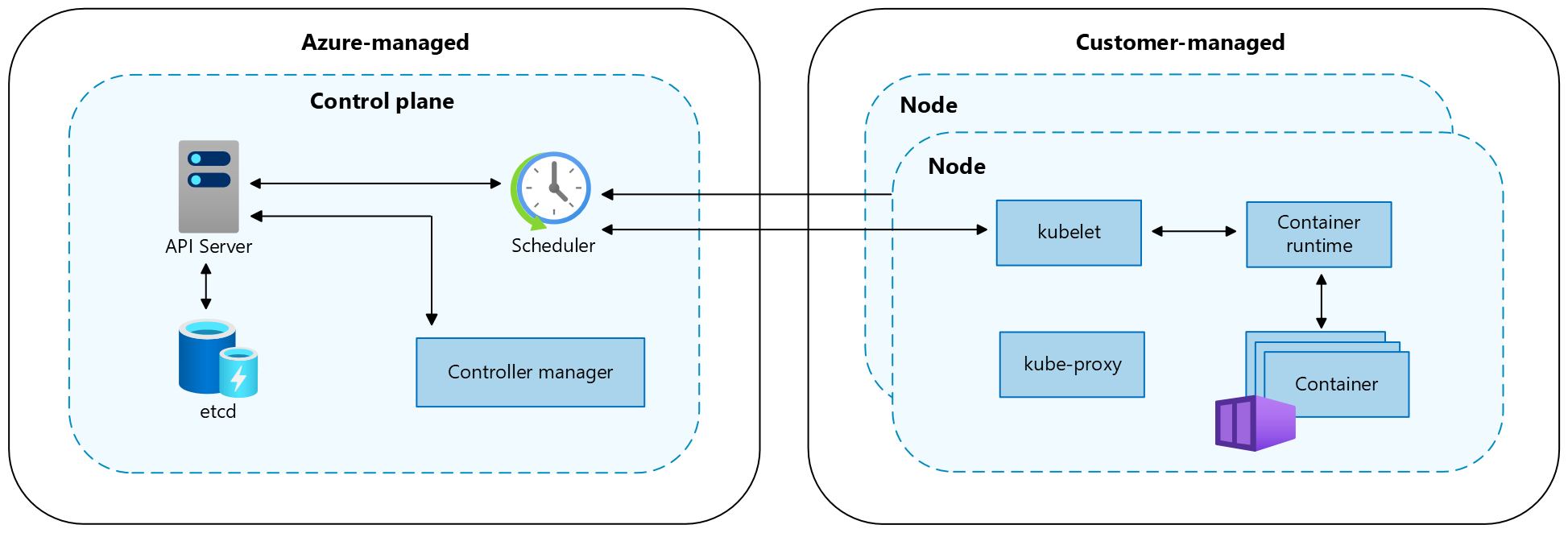
Source: Microsoft Learn — AKS cluster architecture
AKS Automatic
AKS with opinionated, production-ready defaults
- Preconfigured with Microsoft's best practice settings
- Node auto-provisioning — automatic VM sizing and scaling
- Built-in monitoring, network policies, and pod sandboxing
- Automated upgrades and patching
- Reduces operational overhead while retaining Kubernetes API
AKS vs AKS Automatic
| Capability | AKS Standard | AKS Automatic |
|---|---|---|
| Node pool management | Manual configuration | Auto-provisioned |
| Cluster upgrades | Manual or scheduled | Fully automated |
| Security defaults | Configurable | Preconfigured best practices |
| Monitoring | Opt-in setup | Built-in by default |
| Kubernetes API access | Full | Full |
Container Platform Comparison
| Feature | ACI | Container Apps | AKS |
|---|---|---|---|
| Scale to zero | ✓ | ✓ | With KEDA add-on |
| Orchestration | None | Managed (K8s) | Full Kubernetes |
| Service discovery | — | Built-in | CoreDNS |
| Ops complexity | Minimal | Low | High |
| K8s expertise needed | No | No | Yes |
When to Use Which Container Service
ACI
- Simple single-container tasks
- Batch jobs & build agents
- Burst capacity from AKS
Container Apps
- Microservices & APIs
- Event-driven processing
- Teams without K8s skills
AKS / AKS Automatic
- Complex multi-service apps
- Custom operators / CRDs
- Stateful workloads
- GPU / HPC workloads
- Multi-tenant clusters
Azure Compute Decision Guide
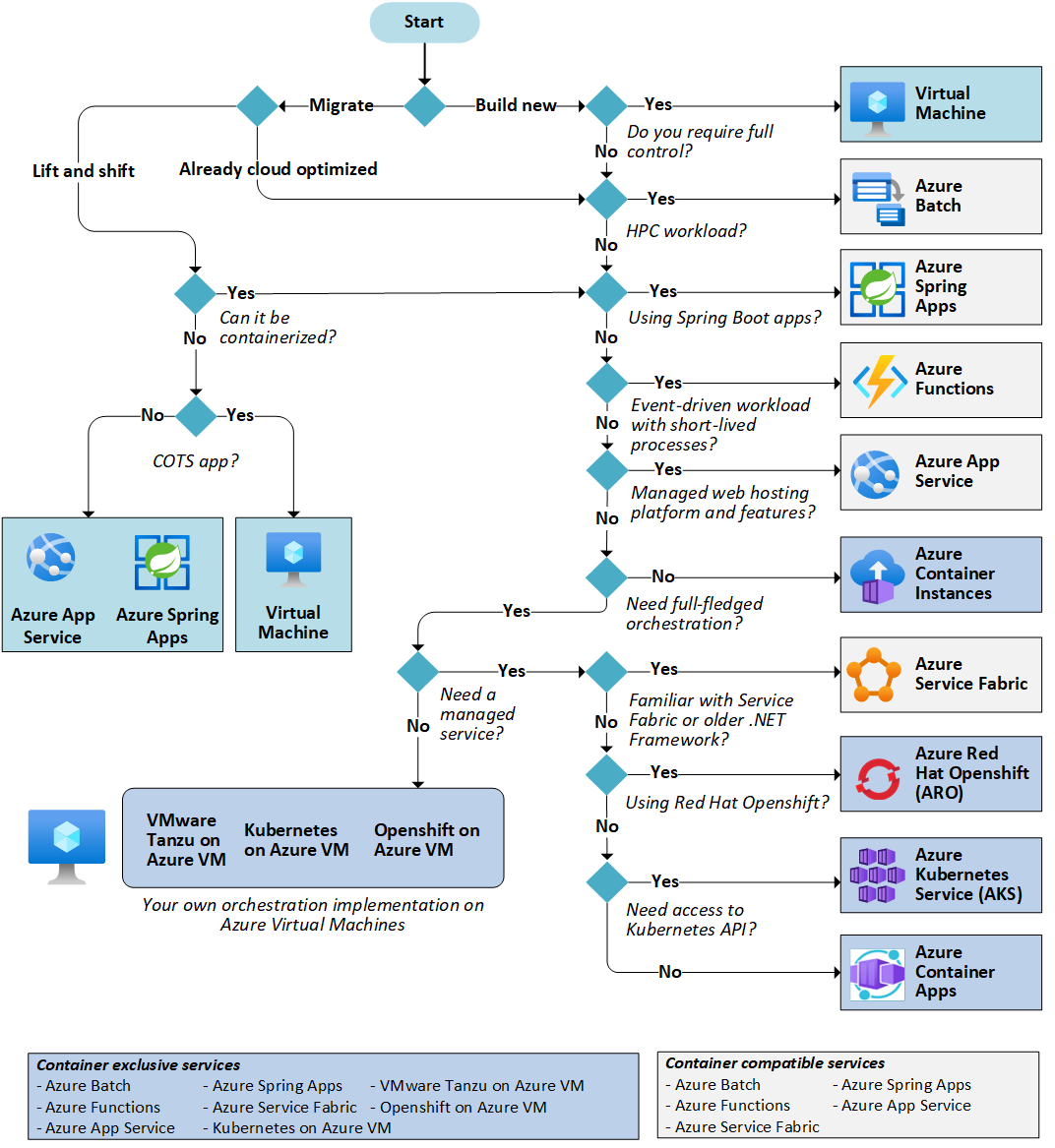
Compute Services Summary
| Service | Model | Scale | Best For |
|---|---|---|---|
| App Service | PaaS | Manual / Auto | Web apps & APIs |
| Functions | Serverless | Event-driven | Event processing, automation |
| ACI | Container | On-demand | Simple tasks, batch |
| Container Apps | Serverless container | Event-driven (0→N) | Microservices |
| AKS | Managed K8s | Cluster autoscaler | Complex orchestration |
Azure Key Vault
Centralized secrets, keys, and certificate management
What is Azure Key Vault?
- Cloud service for securely storing and accessing secrets
- Centralized management of keys, secrets, and certificates
- FIPS 140-2 validated — HSM-backed in Premium tier
- Integrated with Azure RBAC and Azure AD authentication
- Full audit logging via Azure Monitor / Log Analytics
Key Vault Object Types

Key Vault Tiers
| Feature | Standard | Premium |
|---|---|---|
| Software-protected keys | ✓ | ✓ |
| HSM-protected keys | — | ✓ |
| Secrets & certificates | ✓ | ✓ |
| Managed HSM | — | Separate service |
| FIPS 140-2 Level | Level 1 | Level 2 (HSM) |
Access Control Models
Azure RBAC (Recommended)
- Granular, per-object permissions
- Consistent with Azure IAM
- Key Vault Secrets User role
- Key Vault Crypto Officer role
Vault Access Policies
- Legacy model — per-vault
- All-or-nothing per principal
- Max 1024 policies per vault
- Still supported, not recommended
Key Vault Networking
- Public endpoint — accessible over internet with firewall rules
- Service endpoints — restrict to specific VNet subnets
- Private endpoints — fully private via Azure Private Link
- Trusted services bypass — allow Azure services access
- Recommendation: use Private Endpoints for production
Key Vault Best Practices
- Use managed identities to access Key Vault — no secrets in code
- Enable soft delete and purge protection (on by default)
- Use separate vaults per environment (dev, staging, prod)
- Set expiration dates on secrets and rotate regularly
- Enable diagnostic logging for audit and compliance
Key Vault Integration Patterns

Azure Databases
Azure SQL • Azure Cosmos DB
SQL vs NoSQL Databases
SQL (Relational)
- Structured data with fixed schema
- Tables, rows, and columns
- ACID transactions
- Joins across related tables
- Best for: transactional apps, reporting, well-defined data models
- Azure SQL (and others)
NoSQL (Non-Relational)
- Flexible or schema-less data
- Documents, key-value, graph, or column-family
- Horizontal scale-out
- Optimised for specific access patterns
- Best for: high-volume, low-latency, evolving schemas
- Azure Cosmos DB
Azure SQL — The Family
Fully managed relational database service
- Built on the SQL Server engine — full T-SQL compatibility
- Intelligent performance tuning and threat detection
- Built-in high availability — up to 99.995% SLA
- Three deployment models for different scenarios
Azure SQL Deployment Options


Deployment Options Comparison
| Feature | SQL Database | Managed Instance | SQL on VMs |
|---|---|---|---|
| Management | Fully managed | Fully managed | Self-managed |
| SQL Server compat. | ~95% | ~99% | 100% |
| VNet native | Private endpoint | ✓ (injected) | ✓ |
| Cross-DB queries | Elastic query | ✓ | ✓ |
| Best for | New apps | Migrations | Full control |
Purchasing Models
DTU Model
- Bundled compute, IO, storage
- Simple — pre-configured tiers
- Good for predictable workloads
- SQL Database only
vCore Model
- Independent CPU, memory, storage
- Flexible — scale components separately
- Azure Hybrid Benefit eligible
- Both SQL DB & Managed Instance
Azure SQL Service Tiers
| Tier | Use Case | Storage | SLA |
|---|---|---|---|
| General Purpose | Most workloads | Up to 16 TB | 99.99% |
| Business Critical | Low-latency, HA | Up to 16 TB | 99.995% |
| Hyperscale | Large / elastic scale | Up to 100 TB | 99.995% |
Azure SQL — Serverless Compute
Auto-pause and auto-scale for variable workloads
- Available in General Purpose tier (vCore model)
- Auto-scales vCores based on workload demand
- Auto-pause after inactivity — pay only for storage
- Auto-resumes on first connection (~1 min cold start)
- Great for dev/test and intermittent workloads
Azure SQL Security


Azure SQL Best Practices
- Use Azure AD authentication over SQL authentication
- Enable auto-failover groups for geo-redundancy
- Configure long-term backup retention (up to 10 years)
- Use elastic pools for multi-tenant SaaS with variable per-tenant load
- Monitor with Intelligent Insights and Query Performance Insight
Azure Cosmos DB
Globally distributed, multi-model database service
What is Azure Cosmos DB?
- Globally distributed NoSQL and relational database service
- Single-digit millisecond reads and writes at any scale
- Turnkey global distribution — replicate data to any Azure region
- Five consistency levels — tune availability vs. consistency
- 99.999% SLA for multi-region configurations
Cosmos DB APIs


Consistency Levels
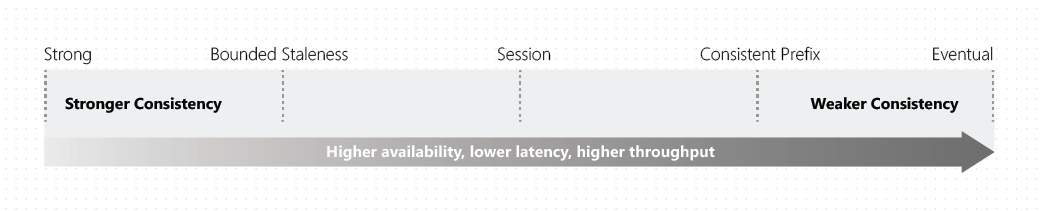
Strong → Bounded Staleness → Session → Consistent Prefix → Eventual
Consistency Levels Compared
| Level | Guarantee | Latency | Use Case |
|---|---|---|---|
| Strong | Linearizable | Higher | Financial transactions |
| Bounded Staleness | Max lag (K, T) | Medium | Leaderboards, dashboards |
| Session | Read your writes | Low | User profiles, carts (default) |
| Consistent Prefix | No out-of-order | Low | Social updates, feeds |
| Eventual | Eventually converge | Lowest | Hit counters, telemetry |
Request Units (RUs)
The currency of Cosmos DB throughput
- 1 RU = cost of a 1 KB point read by ID and partition key
- Writes cost ~5-6x more RUs than reads
- Cross-partition queries cost more than single-partition
- Provision RU/s per container or per database (shared)
- Over-consumption returns HTTP 429 — rate limiting
Partitioning Strategy
- Partition key determines data distribution across physical partitions
- Choose a key with high cardinality and even distribution
- Good keys: userId, tenantId, deviceId
- Avoid: status, country, category (low cardinality → hot partitions)
- Hierarchical partition keys for multi-level distribution
Cosmos DB Capacity Modes
| Mode | Scaling | Pricing | Best For |
|---|---|---|---|
| Provisioned | Manual or autoscale | Per RU/s provisioned | Predictable workloads |
| Autoscale | Auto (10% → 100% of max) | Per RU/s consumed | Variable but bounded load |
| Serverless | On-demand (0 → 5000 RU/s) | Per RU consumed | Dev/test, light workloads |
Cosmos DB Best Practices
- Model data to minimize cross-partition queries
- Prefer embedding over referencing when data is read together
- Use point reads (by ID + partition key) — cheapest at 1 RU
- Reuse the CosmosClient instance — singleton pattern
- Handle 429 throttling with SDK retry logic
SQL vs Cosmos DB
When to use which database service
SQL vs Cosmos DB Overview
Azure SQL
- Relational, structured schema
- ACID transactions, complex JOINs
- Single-region primary (+ replicas)
- Mature ecosystem & tooling
Azure Cosmos DB
- Schema-flexible, document-oriented
- Scale writes globally
- Sub-10ms latency at any scale
- Tunable consistency trade-offs
Feature Comparison
| Dimension | Azure SQL | Cosmos DB |
|---|---|---|
| Data model | Relational (tables) | Document / Multi-model |
| Schema | Fixed, enforced | Flexible, schema-optional |
| Transactions | Cross-table ACID | Single-partition ACID |
| Global writes | Single primary | Multi-region writes |
| Latency (p99) | ~5-10ms | <10ms read, <15ms write |
When to Use Which Database
Choose Azure SQL
- Complex relationships & JOINs
- Strict schema requirements
- Multi-table ACID transactions
- Existing SQL Server workloads
Choose Cosmos DB
- Global distribution needed
- Flexible / evolving schema
- Massive read/write scale
- Low-latency access worldwide
Key Takeaways
- App Service — start here for web apps & APIs
- Functions — event-driven, pay-per-execution serverless
- Container Apps — the sweet spot for containerized workloads
- Key Vault — every production app needs centralized secret management
- Azure SQL & Cosmos DB — complementary, not competing
Resources


Hands-On Lab
Create & configure App Services, Container Apps, Key Vault & CosmosDB
Objectives
- Deploy an Azure App Service and explore its configuration
- Deploy an Azure Container App with a custom container image
- Create a Key Vault, manage secrets & RBAC permissions
- Reference Key Vault secrets from App Service
- Deploy a CosmosDB account, database & container
Prerequisites
- Access to an Azure subscription & resource group
- (Optional) Azure CLI installed and configured
Questions?
Thank you!